AI-assisted development workflow

Your team uses AI. How much manual work remains before deployment?

AI helps with code. Initiating reviews, following up on fixes and maintaining ticket status still takes time.

AKSORT connects these steps with OpenAI Codex, GitHub and Azure into a continuous development workflow.

  • Fewer manual steps

    Automate suitable tasks and checks.

  • See progress in the ticket

    Link code changes, pull requests and deployment status.

  • Stay in control

    Integrate tests, reviews and agreed approvals into the process.

  • Start with a pilot

    Set up and trial a clearly defined workflow in your existing environment.

In the intro call, we clarify where your team currently does manual work and which pilot would make sense.

The foundation is our own development workflow.

Book an intro call

How the workflow works

A change is only complete when it meets the requirement, has been checked and is available in the intended environment. We connect the steps in between and agree which run automatically and where your team makes the decisions.
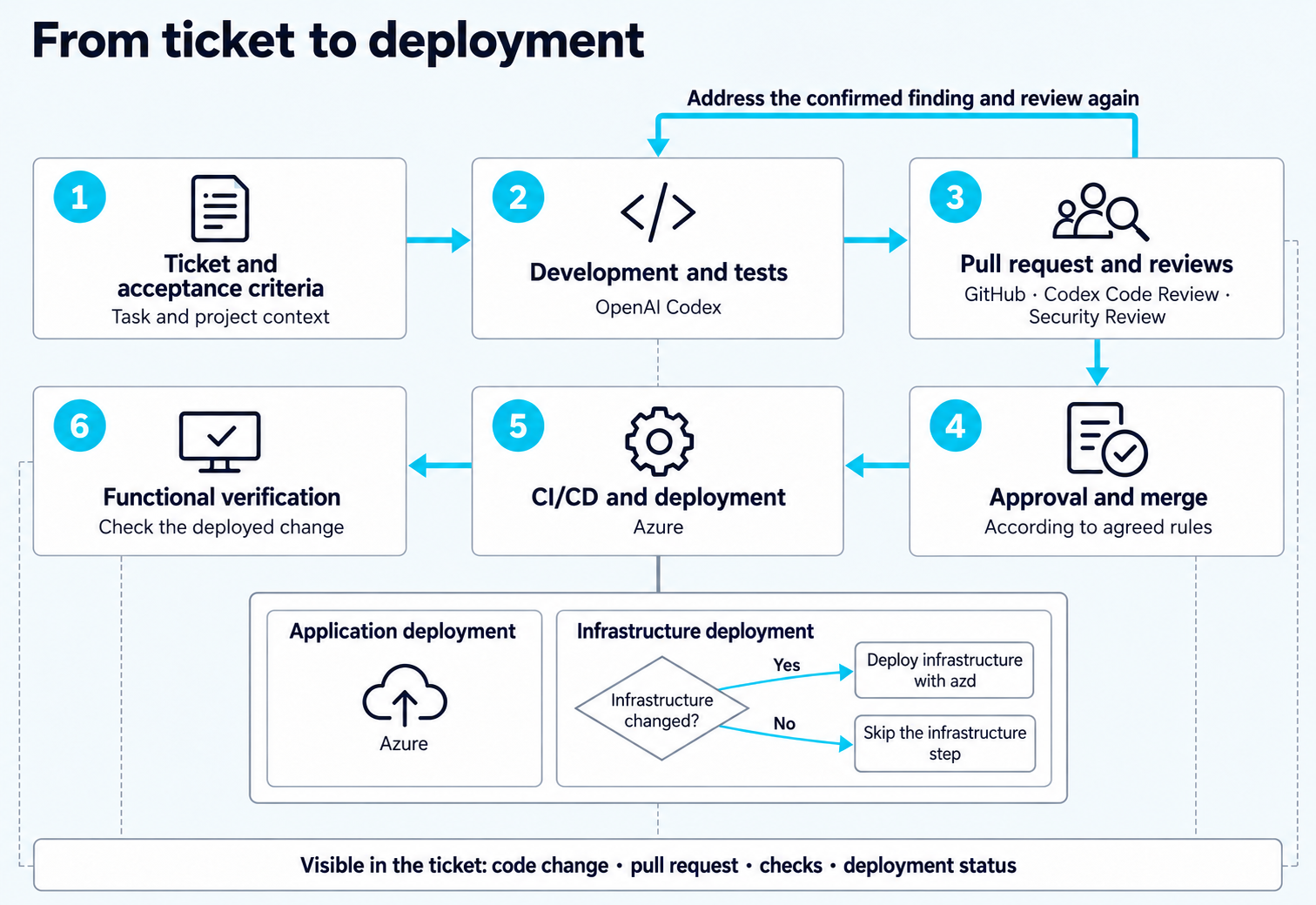
Ticket, development and tests, reviews, approval and merge, Azure deployment and functional check. Confirmed findings are corrected and checked again. Infrastructure is deployed only when changed; progress remains visible in the ticket.
Fig. 1Workflow diagram: from ticket to deployment.
  1. Capture the task in the ticket

    What needs to change? Which existing features must be preserved? How will we know that the task is complete?

    These details form the basis for implementation. Architecture, repository rules and existing tests give Codex the project context it needs.

  2. Develop and test the change

    Codex supports implementation. The change is checked against the acceptance criteria and covered by appropriate tests.

    The code change and its pull request are linked to the ticket. This makes it clear which implementation belongs to which requirement.

  3. Review code and security risks

    We use Codex Code Review to review the code change in the pull request. A security review also investigates potential security issues.

    Review findings are evaluated: does the problem actually exist? What impact would it have? Which correction makes sense?

    Confirmed issues are fixed and checked again. The findings and how they are handled remain traceable. Agreed approvals determine when the change may proceed.

  4. Deploy to Azure through CI/CD

    Deployment follows your release process. Application and infrastructure have separate deployment steps.

    For infrastructure changes, we use the Azure Developer CLI, or azd. The pipeline is configured so that this step runs only when infrastructure definitions change.

    After deployment, the affected feature is checked in the running application.

  5. Make progress visible in the ticket

    The ticket brings together the information about the task:

    • Which code change belongs to it?
    • Is the pull request still open or already approved and merged?
    • Which checks have been performed?
    • Has the change been deployed yet?

    Developers, project managers and business stakeholders can follow progress from the ticket. A completed implementation and an actually deployed change remain distinguishable.
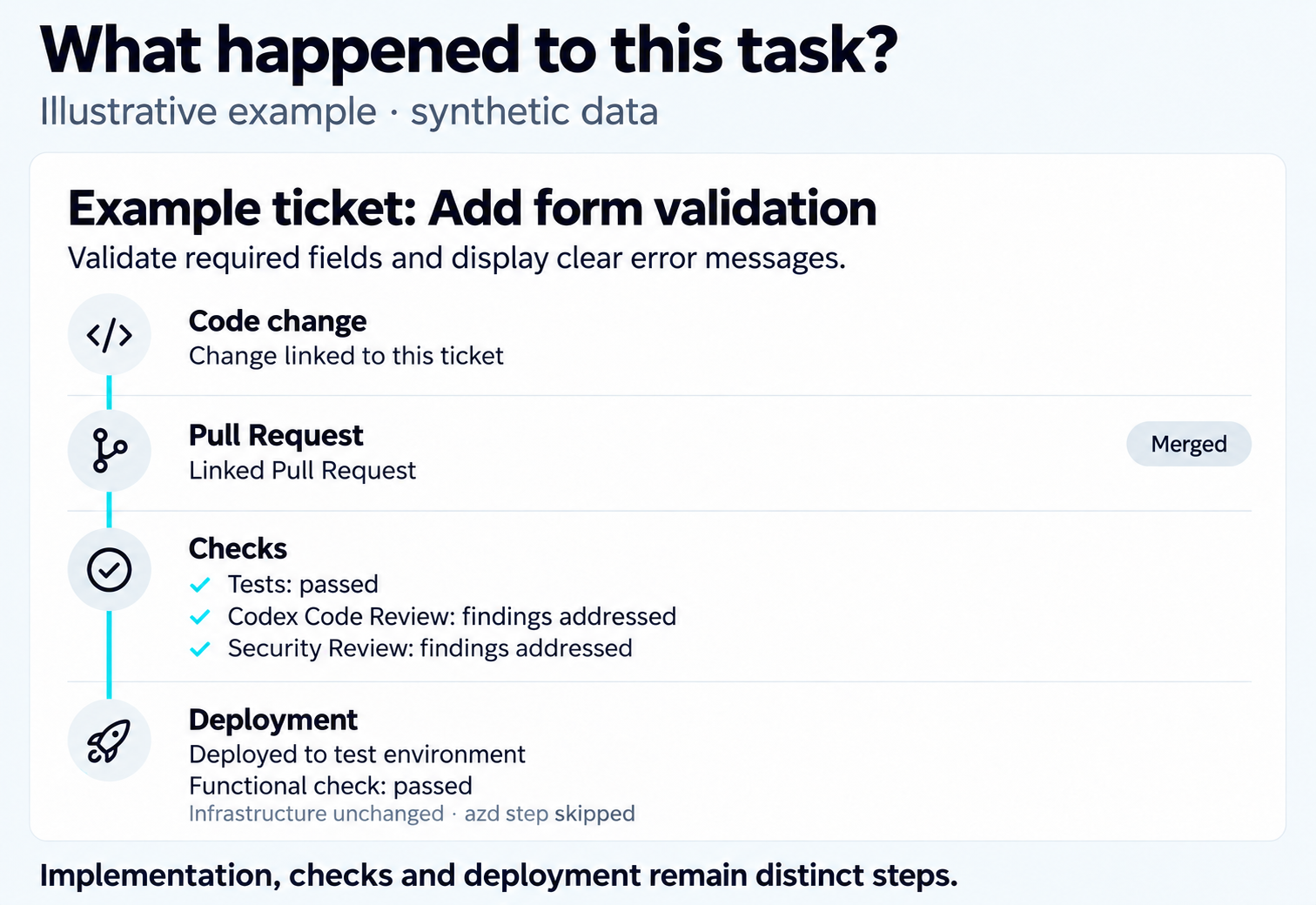
Illustrative ticket with synthetic data: add form validation. Linked code change, merged pull request, tests and addressed review findings, deployment to a test environment and functional check.
Fig. 2Illustrative example: code change, pull request and deployment status in the ticket.
Services

What AKSORT sets up for your team

We look at your existing development process and select a suitable workflow for the pilot together.

Depending on the agreed scope, we set up:

  1. Project context and repository instructions for Codex.
  2. Links between tickets, code changes, pull requests and deployments.
  3. Automated tests, code and security reviews, and rules for handling findings.
  4. CI/CD, approvals and deployment status feedback.
  5. Documentation and an introduction for your team.

The result is a configured and tested workflow for the selected use case. Together, we check which manual steps are removed, where questions remain and whether the approach is suitable for further tasks.

We agree the scope, access, responsibilities and acceptance criteria before implementation.

Intro call

Discuss your development workflow

Are you already using AI in development and looking to connect the next steps more effectively?

In the intro call, we look at your current process and clarify where a limited pilot would make sense. You do not need a fully defined project yet.

Book an intro call